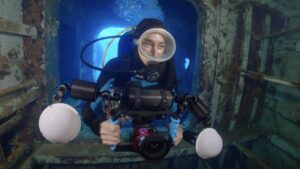
During the workshop, we will cover everything about the accessories needed to get the most out of a GoPro underwater. Accessories such as filters, lenses, and video lights can greatly expand the GoPro’s capabilities and completely change the results of your footage.
The course is a great opportunity to fully understand all the available options, so you can make smarter investment decisions based on your personal needs.
The most basic requirement to attend the course is a GoPro with its dive housing. Although after the workshop you’ll have a clear idea of your ideal gear setup for your next underwater adventure, this trip to Cayman is also a great opportunity to capture amazing memories from some fantastic dives.
If you are in Europe, you can contact Carlos Villoch through his store at www.glowdive.com, where he can advise you on the ideal equipment for your needs.
If you are in the USA and want to equip your GoPro for this trip to Cayman, we’ve partnered with Backscatter and prepared a list of accessories to improve your footage. Contact us through this form and we’ll connect you with a sales representative who is familiar with this workshop and can provide personalized advice.
We’ve also prepared a suggested list where you can select the products you’re interested in, allowing us to respond more efficiently to your needs.
To help you understand the priority of each item, here’s what they’re used for:
Filters are designed to reduce the excess blue light underwater and restore natural colors using ambient light. There are different versions with one or two filters to cover various depth ranges, as well as options that include a macro lens for shooting small subjects.
A wide-angle lens significantly enhances the GoPro’s capabilities. The bundle we’ve selected — including lens, bayonet mount, and a set of two filters — is one of the most impactful upgrades for improving footage quality. In Cayman, it’s especially useful for capturing reefscapes, vertical walls, swim-throughs, wrecks, and Stingray City. In addition to offering a more dramatic perspective, it reduces the amount of water between the camera and the subject, improving overall image quality.
Video lights help restore color when ambient light is limited, in shaded areas, or when bringing out the vivid colors of sponges and gorgonians during wall dives.
During the workshop, we will go in depth into all the features of video lights, but if you prefer to arrive already equipped, here are some excellent high-quality options.
Fill out this form with your email and Rob from Backscatter will assist you. If you contact Backscatter directly, ask for Rob and mention that you’re attending the Cayman Workshop so he understands your needs and priorities.